
GCP Professional Cloud Developer: GCPPCD
- Practice- Focused prep for the official GCP Professional Cloud Developer: GCPPCD exam.
- Updated to latest GCP Professional Cloud Developer: GCPPCD exam blueprint
Share this Course
GCP Professional Cloud Developer (GCPPCD) certification validates a professional’s ability to design, build, test, and deploy scalable cloud-native applications on Google Cloud Platform (GCP) using recommended tools and best practices. It demonstrates expertise in integrating cloud services, implementing CI/CD pipelines, and developing secure, high-performance applications that run reliably in distributed cloud environments. This certification also confirms proficiency in working with cloud-native architectures, APIs, containers, serverless platforms, and monitoring tools to ensure application performance and scalability. Earning the GCP Professional Cloud Developer credential helps developers prove their cloud development skills and advance careers in roles such as Cloud Developer, DevOps Engineer, and Cloud Solutions Engineer.
Exam Overview
120 mins
100 questions
$200
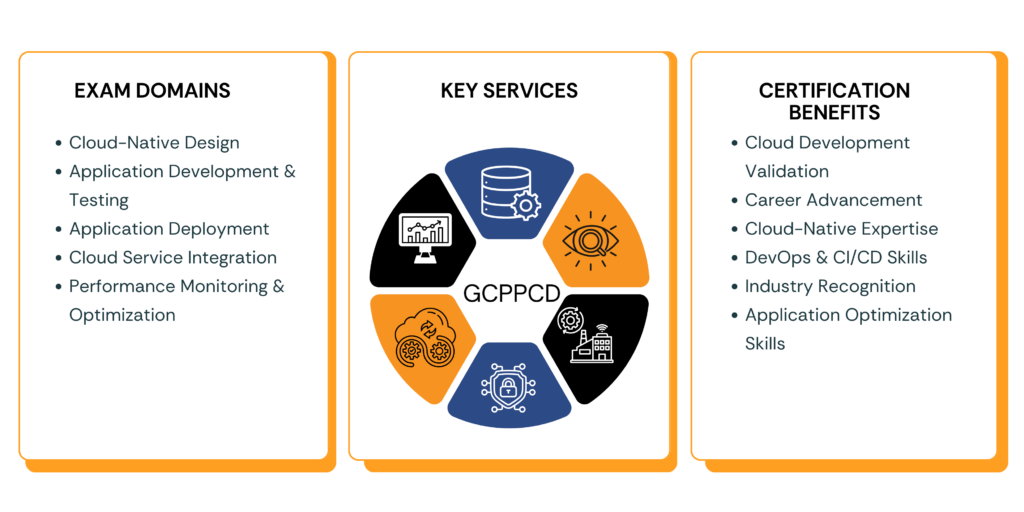
Key Domain and Weighting
Why Choose US?
Unlock your potential with over 3,000 expertly crafted questions for the Recognition as a GCP Professional Cloud Developer: GCPPCD exam!
Your Path to Success: 320 Students Passed the Recognition as a GCP Professional Cloud Developer: GCPPCD exam with Our Guidance
Join the Elite: Achieve a 93.9% Average Score on AI Practitioner – GCPPCD with Our Realistic Preparation and Near-Real Questions!
Certification Study Guides
1. Cloud-Native Application Design
Understand microservices architecture and distributed system design.
Learn how to design scalable, reliable, and high-availability applications.
Study API design, REST vs gRPC communication, and asynchronous event-driven architectures.
Explore caching strategies, session management, and cost-efficient architecture patterns.
2. Google Cloud Development Environment
Set up local and cloud-based development environments using Cloud SDK, Cloud Shell, and Cloud Workstations.
Use developer tools such as Cloud Code, Skaffold, and IDE integrations for application development.
Learn authentication methods and secure connections to cloud services.
3. Application Development and Testing
Build cloud-native applications using containerization and modern programming frameworks.
Implement CI/CD pipelines using tools like Cloud Build and Artifact Registry.
Practice different testing methods including unit testing, integration testing, performance testing, and load testing.
4. Application Deployment on Google Cloud
Deploy applications using platforms such as App Engine, Cloud Run, Cloud Functions, and Google Kubernetes Engine (GKE).
Understand container deployment, version control, and release strategies like A/B testing and feature flags.
Learn automated deployment pipelines and scaling strategies for production environments.
5. Integrating Google Cloud Services
Integrate applications with Cloud Storage, Cloud SQL, Firestore, and Bigtable.
Build event-driven systems using Pub/Sub, Eventarc, Cloud Tasks, and Cloud Scheduler.
Learn how to interact with Google Cloud APIs and implement secure service-to-service communication.
6. Monitoring, Logging, and Optimization
Monitor applications using Cloud Monitoring, Cloud Logging, and Error Reporting.
Analyze performance metrics and logs to troubleshoot issues.
Optimize application performance, reliability, and cost efficiency in cloud environments.
7. Security and Best Practices
Understand Identity and Access Management (IAM) roles and permissions.
Secure APIs and services using authentication and authorization mechanisms.
Implement best practices for protecting application data and cloud resources.
Best Resources
Google Cloud Professional Cloud Developer Learning Path
Google Cloud Skills Boost Training
Official GCP Certification Exam Guide
Google Cloud Documentation and Developer Guides
Google Cloud Community and Developer Forums
Certify360 Mock Exams and Practice Tests
How to Pass the Examination
Understand the Exam Domains: Focus on cloud-native application design, CI/CD pipelines, service integration, containerization, and monitoring to understand how these components work together in real-world cloud development.
Hands-On Practice: Build and deploy applications using Google Cloud services. Practice creating APIs, deploying containers, integrating messaging services, and managing cloud resources.
Take Practice Exams: Use Certify360 practice exams and quizzes to test your knowledge with scenario-based questions that simulate the real certification exam environment.
Review Cloud Development Concepts: Revisit key concepts such as microservices architecture, serverless computing, event-driven design, and DevOps automation to strengthen cloud-native development skills.
Tips to Pass
a. Understand the Key Domains
Focus on these major areas:
Cloud-Native Application Design
Application Development and Testing
Application Deployment on GCP
Service Integration and APIs
Monitoring and Performance Optimization
Security and Identity Management
b. Use Official Google Cloud Resources
Google Cloud Training Courses
Google Cloud Certification Guide
Google Cloud Documentation
Developer Tutorials and Labs
c. Practice Real-World Development
Create cloud applications, deploy containers, integrate APIs, and build event-driven workflows to gain practical experience working with Google Cloud services.
d. Take Mock Tests on Certify360
Practice with Certify360’s realistic mock exams to evaluate your readiness. The platform provides structured quizzes, performance insights, and exam-style scenario questions that help improve accuracy, speed, and confidence before taking the actual certification exam.
How Learners Benefited from Certify360 in Achieving Certification ?
Pass GCPPCD on your First Try
AI-powered practice tests designed to simulate the real exam
- No Credit Card Required