
Associate Google Workspace Administrator

Share this Course

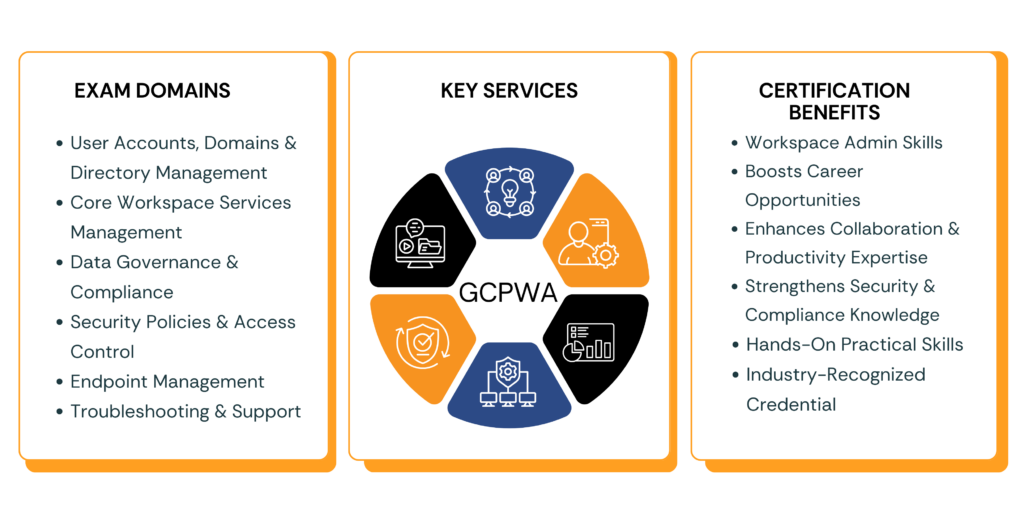
Google Workspace Associate Administrator infographic showing exam domains, services, and certification benefits

The Associate Google Workspace Administrator certification validates your ability to manage and secure organizational workflows using Google Workspace tools. It is ideal for IT administrators and professionals responsible for user management, access control, security policies, and service configuration across applications like Gmail, Drive, and Meet. This certification demonstrates your expertise in deploying, managing, and optimizing collaboration environments, making you a valuable asset for organizations embracing cloud-based productivity solutions.

With Certify360.ai, preparing for the Associate Google Workspace Administrator exam becomes more effective and streamlined. The platform offers AI-driven study plans, real-world scenarios, and practice exams aligned with official exam objectives. Through hands-on learning, performance tracking, and adaptive mock tests, Certify360.ai helps you build practical skills and confidently pass the exam while mastering Google Workspace administration.

Exam Overview

120 mins

60 questions

$125

Key Domain and Weighting

Managing User Accounts, Domains & Directory
Web Designer 22%
Managing Core Workspace Services
Web Designer 20%
Managing Data Governance & Compliance
Web Designer 14%
Managing Security Policies & Access Controls
Web Designer 20%
Managing Endpoints
Web Designer 10%
Google Workspace Administrator exam domains key services and certification benefits infographic

Why Choose US?

Unlock your potential with over 3,000 expertly crafted questions for the Recognition as a Associate Google Workspace Administrator exam!

Your Path to Success: 320 Students Passed the Recognition as a Associate Google Workspace Administrator exam with Our Guidance

Join the Elite: Achieve a 93.9% Average Score on AI Practitioner – Associate Google Workspace Administrator with Our Realistic Preparation and Near-Real Questions!

Certification Study Guides

1. User and Resource Management

  • Create and manage users, groups, and organizational units
  • Configure roles and administrative privileges
  • Manage shared resources like calendars and rooms

2. Google Workspace Services Configuration

  • Configure Gmail, Drive, Meet, and Calendar settings
  • Manage sharing policies and collaboration features
  • Optimize service settings for organizational needs

3. Security and Access Control

  • Implement 2-step verification and identity management
  • Manage access controls and data protection policies
  • Monitor suspicious activities and enforce security rules

4. Device Management

  • Manage mobile devices and endpoints
  • Enforce security policies on devices
  • Configure endpoint management settings

5. Monitoring and Reporting

  • Use Admin Console reports and audit logs
  • Monitor system usage and performance
  • Troubleshoot user and service issues

6. Data Governance and Compliance

  • Manage data retention and archiving policies
  • Use Vault for eDiscovery and compliance
  • Ensure regulatory compliance and data protection

Best Resources

  • Google Workspace Admin Help Center

  • Google Workspace Learning Center

  • Official Certification Exam Guide

  • Google Workspace Admin Console Documentation

  • Community Forums and Case Studies

  • Certify360.ai Mock Tests and Practice Labs

How to Pass the Examination

Understand the Learning Outcomes

  • Focus on key domains like user management, security, core services, and troubleshooting

  • Learn how Workspace tools support collaboration and productivity in organizations

Hands-On Practice

  • Practice user creation, group management, and service configuration in Admin Console

  • Work on real scenarios involving security settings, device management, and issue resolution

Take Practice Tests

  • Use Certify360.ai mock exams and quizzes for exam readiness

  • Improve speed, accuracy, and confidence with scenario-based questions

Review Core Concepts

  • Revisit IAM concepts, security policies, data governance, and reporting tools

  • Focus on high-weight domains like user management and security

Tips to Pass

a. Understand the Exam Domains

  • User & Directory Management

  • Core Workspace Services

  • Security & Access Controls

  • Data Governance & Compliance

  • Endpoint Management

  • Troubleshooting

b. Use Official Google Resources

  • Google Workspace Admin Documentation

  • Google Learning Center

  • Exam Guide and Help Articles

c. Practice Real-World Scenarios

  • Manage users, configure services, apply policies, and troubleshoot issues to build real admin confidence

d. Take Mock Tests on Certify360.ai

  • Attempt real exam–style questions, track performance, and improve weak areas for better exam success


How Learners Benefited from Certify360 in Achieving Certification ?

Pass Associate Google Workspace Administrator on your First Try

AI-powered practice tests designed to simulate the real exam

  • No Credit Card Required
Scroll to Top